What we'll do
- Read a 4-band resistor step by step.
- Look at the color chart and learn which end to start from.
- Use the calculator both ways: colors to value, value to colors.
- Work out the resistor an LED needs with Ohm's law.
- Add up resistors in series and in parallel.
Why it's useful: you can sort a bag of resistors in seconds, and build circuits without burning out LEDs or overloading an Arduino pin.
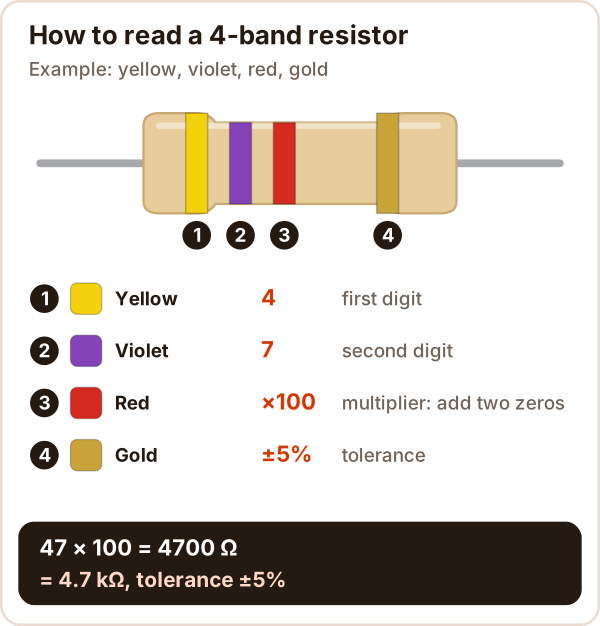
How do you read resistor color codes?
Read the bands left to right: the first bands are digits, the next one is the multiplier, and the last one is the tolerance.
- Find the direction: turn it so the gold or silver band is on the right.
- Write the digits: on a 4-band resistor the first two bands are two digits (yellow 4, violet 7: 47).
- Multiply: the third band tells you how many zeros to add (red ×100: 4700 Ω).
- Add the tolerance: the last band is how far the real value may be off (gold ±5%).
Result: 4700 Ω = 4.7 kΩ ±5%, so the resistor will measure somewhere between 4465 Ω and 4935 Ω.
Resistor color code chart
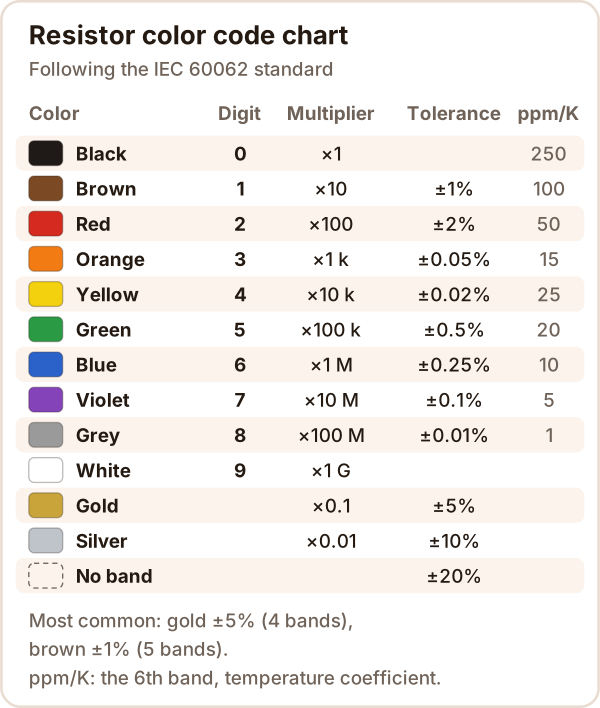
The chart follows the IEC 60062 standard. You only need the order: black 0, brown 1, red 2 ... white 9. As a multiplier, a color means "that many zeros": orange is 3, so ×1000.
Resistor color code calculator
Try it: tap the colors, or type 4.7k, 220 or 10k in the box to draw the bands, with the tolerance range and the nearest standard value.
This is a resistor calculator with three parts: color code (4, 5 and 6 bands, both directions), LED resistor, and series / parallel. It needs JavaScript. If it didn't load, use the chart above and the formulas below.
The calculator also checks standard values: most resistors you can get come from the E12 and E24 series (IEC 60063). You won't find a 4.8 kΩ resistor, but you will find 4.7 kΩ.
Which end do you start from?
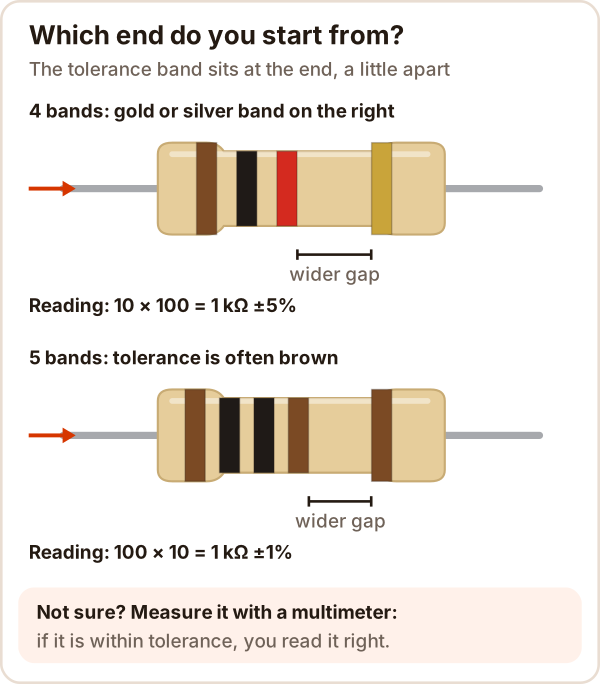
Start reading from the end opposite the tolerance band.
- A gold or silver band is almost always last; gold and silver can't be the first band.
- Wider gap: the tolerance band sits a little apart from the others.
- If the first band comes out black, you are most likely reading it backwards.
- Not sure? Measure it: the resistance setting on a multimeter settles it in seconds. If the reading is within tolerance, you had the right direction.
How do you read 5-band and 6-band resistors?
A 5-band resistor has three digits; a 6th band, if there is one, is the temperature coefficient.
| Bands | Digits | Multiplier | Tolerance |
|---|---|---|---|
| 3 | 1, 2 | 3 | none: 20% |
| 4 | 1, 2 | 3 | 4 |
| 5 | 1, 2, 3 | 4 | 5 |
| 6 | 1, 2, 3 | 4 | 5 (6th band: ppm/K) |
5-band example: brown, black, black, brown, brown = 100 × 10 = 1 kΩ ±1%. One more brown band at the end means 100 ppm/K: the value drifts by 100 parts per million for every 1 °C change.
Practice problems with answers
- Brown, black, red, gold: 10 × 100 = 1 kΩ ±5% (950 Ω to 1.05 kΩ)
- Red, red, brown, gold: 22 × 10 = 220 Ω ±5%
- Yellow, violet, orange, gold: 47 × 1000 = 47 kΩ ±5%
- Orange, orange, gold, gold: 33 × 0.1 = 3.3 Ω ±5%
- Brown, black, black, red, brown: 100 × 100 = 10 kΩ ±1%
- 330 Ω on 4 bands? 33 and one zero: orange, orange, brown, gold
- 10 kΩ on 4 bands? 10 and three zeros: brown, black, orange, gold
Check your own problems with the calculator above: pick the colors and the answer appears.
LED resistor calculator: the math
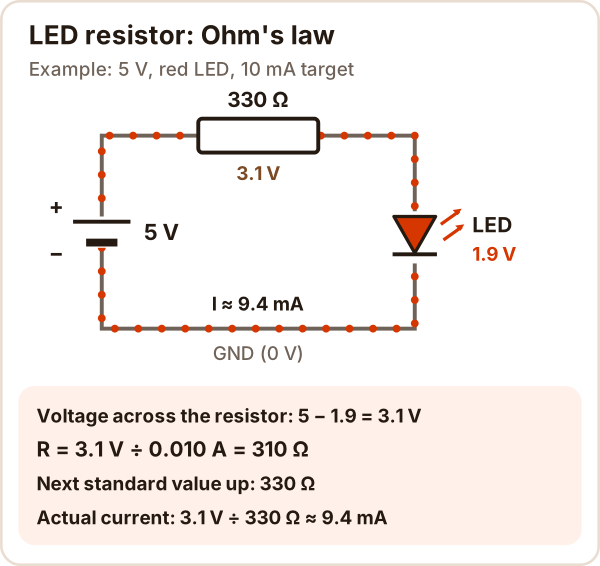
The resistor in series with an LED limits the current, and its value comes from Ohm's law (V = I × R):
R = (supply − LED voltage) ÷ current
R = (5 V − 1.9 V) ÷ 0.010 A
R = 310 Ω  →  standard: 330 Ω
- The LED voltage (Vf) depends on the color: red is about 1.9 V, blue and white about 3.3 V (typical values from Kingbright 5 mm LED datasheets).
- Round up to the next standard value: the current drops a little and the LED stays safe.
- Check the power: P = V × I. Here 3.1 V × 9.4 mA ≈ 0.03 W, so a 1/4 W resistor is plenty.
- Arduino pins: ATmega pins can supply up to 40 mA; around 10 mA is usually enough for an LED and easy on the pin.
The LED resistor tab in the calculator does this for any color and voltage. To try it on an Arduino Uno, build the circuit on a breadboard:
// Pin 8 -> 330 Ω resistor -> LED long leg (anode)
// LED short leg (cathode) -> GND
const int LED_PIN = 8;

void setup() {
  pinMode(LED_PIN, OUTPUT);
}

void loop() {
  digitalWrite(LED_PIN, HIGH);  // about 9 mA
  delay(500);
  digitalWrite(LED_PIN, LOW);
  delay(500);
}
New to the board? See What is Arduino?
Resistors in series and parallel
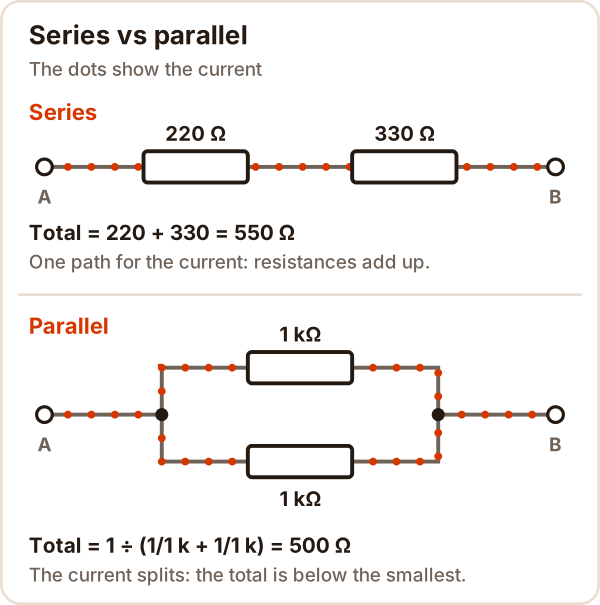
In series, resistances add up; in parallel, the total is smaller than even the smallest resistor.
| Connection | Formula | Example |
|---|---|---|
| Series | R = R1 + R2 + ... | 220 + 330 = 550 Ω |
| Parallel | 1/R = 1/R1 + 1/R2 + ... | 1 kΩ and 1 kΩ: 500 Ω |
| Two in parallel | R = (R1 × R2) ÷ (R1 + R2) | 220 and 330: 132 Ω |
This is how you make a value you don't have: two 1 kΩ resistors give 2 kΩ in series and 500 Ω in parallel. Capacitors work the other way around: they add up in parallel.
Common mistakes
| Symptom | Cause | Fix |
|---|---|---|
| Value is 10× or 100× off | Reading the multiplier as a digit | The multiplier band means "how many zeros" |
| First band is gold or silver | Reading it backwards | Flip it so gold is on the right |
| Brown, red and orange look alike | Dim light, faded paint | Check in daylight, measure with a multimeter |
| Reading is different in the circuit | Other paths in parallel affect the reading | Lift one leg of the resistor out of the circuit |
| LED burned out instantly | No resistor, or one that's too small | Always put a resistor in series with an LED |
| LED is very dim | Resistor too large (10 kΩ instead of 1 kΩ, say) | Re-read the colors, use the LED tab |
| Resistor gets hot | Power above the resistor's rating | Work out P = V × I, pick a higher wattage |
Sources
Accessed October 17, 2026
- Wikipedia, Electronic color code: the IEC 60062:2016 table (digits, multipliers, tolerance, temperature coefficient) and tips on reading direction.
- Wikipedia, E series of preferred numbers: IEC 60063 E12 and E24 values.
- SparkFun, Resistors: series and parallel formulas, common power ratings (1/4 W, 1/2 W), an LED resistor example.
- Kingbright datasheets: WP7113ID red, WP7113YD yellow, WP7113SGD green, WP7113ZGC green 525 nm, WP7113QBC/D blue, WP7113QWC/D white: forward voltage (typical and maximum) and maximum continuous current.
- Arduino Docs, Blink: the LED's long leg is the anode, a 220 Ω example, choosing the resistor with Ohm's law.
- Arduino Docs, Digital Pins: the 40 mA limit on ATmega pins.