What we'll do
- Look inside a DC motor and see why it spins.
- Use an H-bridge to run it forward, backward, and brake it.
- Control speed with PWM, and try it in a live sandbox.
- Wire an L298N motor driver to an Arduino and write direction and speed code.
Why it's useful: most robot wheels, propellers and conveyors run on DC motors. Once you can set direction and speed from code, you're halfway to a moving robot.
What is a DC motor?
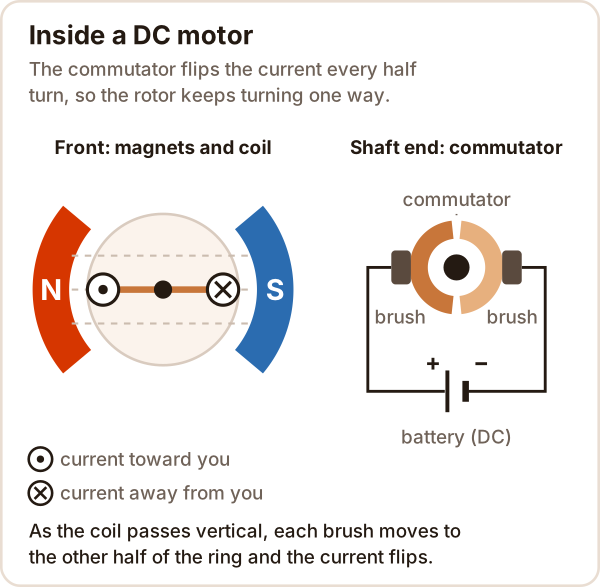
A DC motor turns direct current from a battery or adapter into rotation. Apply a voltage across its two terminals and it spins; swap the terminals and it spins the other way.
- Stator: the fixed magnets on the outside.
- Rotor: the coils on the shaft, the part that turns.
- Commutator: a split copper ring on the end of the shaft.
- Brushes: two small contacts that rub on the commutator and feed current to the coil.
How does a DC motor work?
A wire carrying current inside a magnetic field feels a force. One side of the coil is pushed up, the other side down, and the rotor turns.
After half a turn that push would turn the rotor back. Right at that moment the commutator reverses the current in the coil, so the force keeps turning it the same way (the moment the symbols swap in the animation).
A motor and a generator are the same machine: a spinning motor also produces a voltage. Braking uses this.
Reversing a DC motor: the H-bridge
To reverse the motor you have to flip the voltage across its terminals. A four-switch H-bridge does that.
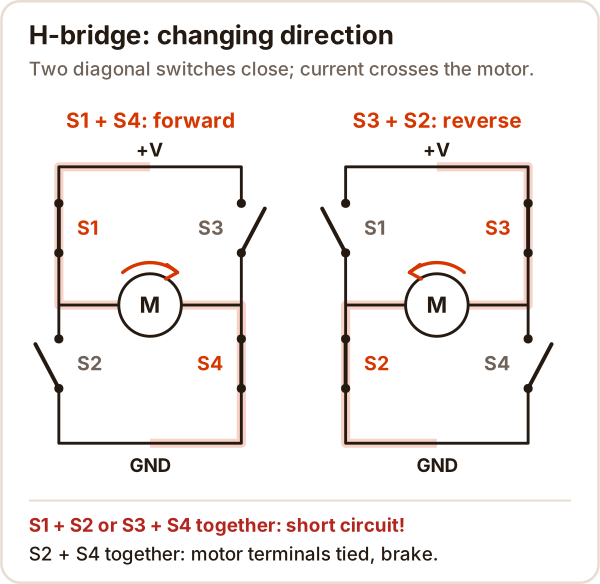
- S1 + S4: forward.
- S3 + S2: reverse.
- S2 + S4: both motor terminals are tied together. The current the spinning motor generates brakes it, and it stops quickly.
- Never S1 + S2 or S3 + S4: current skips the motor and goes straight to GND. That's a short circuit.
In real drivers the switches are transistors.
DC motor speed control: PWM
The easiest way to set speed is PWM: switching the voltage on and off very fast. The larger the share of time it stays on (the duty cycle), the higher the average voltage the motor sees, and the faster it turns.
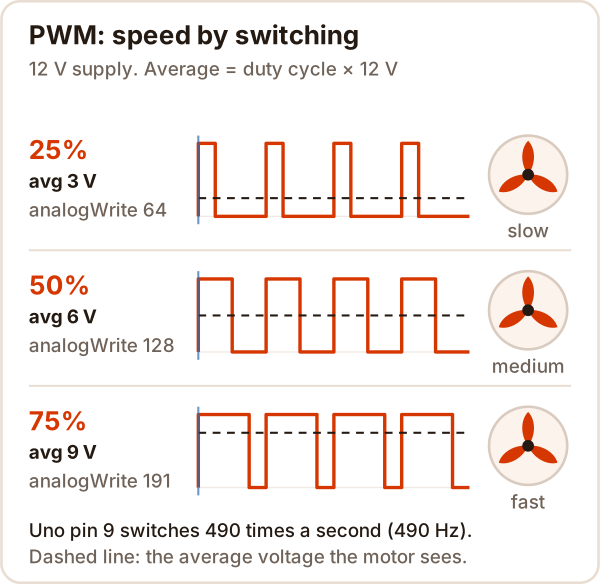
average voltage ≈ duty cycle × supply voltage
analogWrite value = duty cycle × 255
On an Arduino Uno, analogWrite() only works on pins 3, 5, 6, 9, 10 and 11. It runs at 490 Hz, or 980 Hz on pins 5 and 6.
Try it yourself
Tap the switches, follow the current, then change the speed with the slider.
This is a sandbox where you can flip the four H-bridge switches and set motor speed with a PWM slider; it needs JavaScript. If it didn't load, the H-bridge and PWM pictures above show the same thing.
Try this: close S1 and S2 together and read the warning. Then drop the duty cycle to 10%. Real motors also can't beat friction at low duty, and may not turn at all.
What does a motor driver do?
A motor driver lets the Arduino's weak signals switch the battery's large current into the motor. An Arduino pin can't drive a motor directly:
- The absolute maximum current for one ATmega328P pin (the Uno's chip) is 40 mA.
- Even a small 3 V motor (FA-130) draws about 2.1 A when stalled.
The L298N has two H-bridges inside, so it can drive two motors independently.
How to wire an L298N motor driver
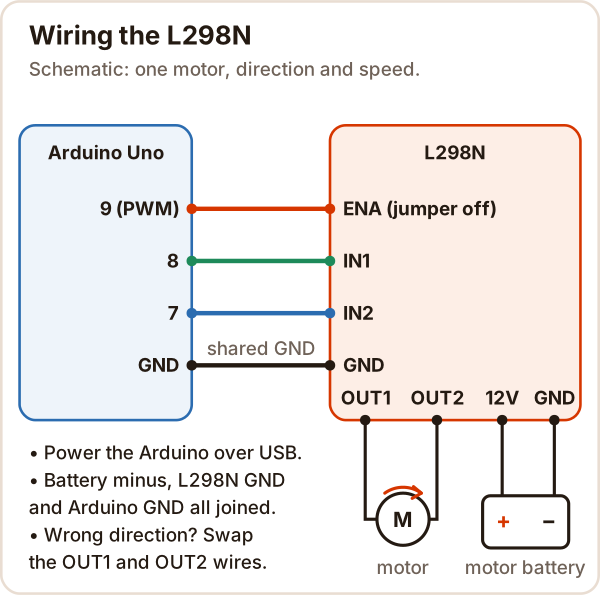
| L298N | Connect to |
|---|---|
| ENA | Arduino pin 9 (PWM). Remove the ENA jumper first |
| IN1, IN2 | Arduino pins 8 and 7 |
| OUT1, OUT2 | The two motor terminals |
| 12V | Motor battery plus |
| GND | Battery minus and Arduino GND |
What each pin combination does (from the L298 datasheet table):
| IN1 | IN2 | ENA | Motor |
|---|---|---|---|
| HIGH | LOW | HIGH or PWM | Forward |
| LOW | HIGH | HIGH or PWM | Reverse |
| same | same | HIGH | Brake (fast stop) |
| any | any | LOW | Coast (freewheel) |
Two details that matter:
- Voltage drop: the L298 burns some voltage itself. Per the datasheet, the total drop at 1 A is 1.8 V typical, 3.2 V max; at 2 A it's up to 4.9 V. Run a 6 V motor from a 6 V battery and it gets about 4 V.
- The 5V jumper: the module has a 5 V regulator. The user guide says to fit the jumper when the supply is below 12 V, and then the 5V pin can power the Arduino. With a higher supply, remove the jumper and power the Arduino separately.
Arduino code for direction and speed
// DC motor with L298N: direction and speed (Arduino Uno)
// ENA -> 9 (PWM), IN1 -> 8, IN2 -> 7, grounds connected
const int ENA = 9;
const int IN1 = 8;
const int IN2 = 7;

void forward(int speed) {   // speed: 0-255
  digitalWrite(IN1, HIGH);
  digitalWrite(IN2, LOW);
  analogWrite(ENA, speed);
}

void reverse(int speed) {
  digitalWrite(IN1, LOW);
  digitalWrite(IN2, HIGH);
  analogWrite(ENA, speed);
}

void brake() {              // ties both terminals together, quick stop
  digitalWrite(IN1, LOW);
  digitalWrite(IN2, LOW);
  digitalWrite(ENA, HIGH);
}

void coast() {              // driver off, motor freewheels
  digitalWrite(ENA, LOW);
}

void setup() {
  pinMode(ENA, OUTPUT);
  pinMode(IN1, OUTPUT);
  pinMode(IN2, OUTPUT);
}

void loop() {
  for (int s = 80; s <= 255; s += 5) {  // ramp up gently
    forward(s);
    delay(40);
  }
  delay(1000);
  brake();                  // stop before changing direction
  delay(500);
  reverse(150);             // about 60% speed backward
  delay(1500);
  coast();
  delay(1500);
}
Want a speed knob? Add a potentiometer:
// Speed from a potentiometer: wiper to A0, outer legs to 5V and GND
const int ENA = 9, IN1 = 8, IN2 = 7;

void setup() {
  pinMode(ENA, OUTPUT);
  pinMode(IN1, OUTPUT);
  pinMode(IN2, OUTPUT);
  digitalWrite(IN1, HIGH);  // direction: forward
  digitalWrite(IN2, LOW);
}

void loop() {
  int value = analogRead(A0);   // 0-1023
  analogWrite(ENA, value / 4);  // 0-255
}
What voltage does a DC motor need?
The voltage on its label or datasheet; there's no single answer. A small FA-130 type motor, for example, is made for 3 V.
- Too low: it turns slowly and weakly.
- Much too high: it runs hot and wears out sooner.
- Driver losses: with an L298N the motor gets about 2 V less than the supply.
What is a gear motor?
A gear motor is a DC motor with a gearbox on its shaft. A 1:48 gear motor's output turns 48 times slower, and its torque (turning force) goes up by roughly 48 times, a little less after gear losses. Robot wheels usually use these.
If you need to go to a specific angle, a servo motor fits better; for precise step-by-step positioning, a stepper motor. To send a DC motor to a position with an encoder, you use PID.
Common mistakes
| Symptom | Cause | Fix |
|---|---|---|
| Always full speed, speed won't change | ENA jumper still on | Remove the jumper, wire ENA to pin 9 |
| Motor doesn't turn, LED is on | Grounds not shared, or ENA not connected | Tie battery minus to Arduino GND, check the ENA wire |
| Hums at low speed but doesn't turn | Average voltage can't beat friction | Find the lowest value that works and stay above it |
| Arduino resets when the motor starts | Motor current pulls the Arduino's supply down | Power the motor from its own battery, keep grounds shared |
| Driver gets very hot | Motor draws too much current or is jammed | Reduce the load, check the shaft, keep the heat sink on |
Safety: a jammed shaft makes the motor draw its maximum current, and the driver and wires heat up: cut the power, don't hold the motor by hand. Be very careful about short circuits with LiPo batteries.
Sources
Accessed: 17 October 2026
- STMicroelectronics, L298 Dual Full-Bridge Driver datasheet: 46 V, 2 A per channel, total voltage drop (VCEsat), direction and brake table.
- Handson Technology, L298N Dual H-Bridge Motor Driver user guide: the module's 5 V regulator and jumpers.
- Arduino Docs, analogWrite(): PWM pins, frequencies and the 0-255 range.
- Microchip, ATmega328P datasheet: 40 mA absolute maximum per pin.
- HyperPhysics (Georgia State University), DC Motor and Generator and Motor: operating principle, a motor working as a generator.
- Pololu, Mabuchi FA-130 specs: 3 V operating voltage, about 2.1 A stall current at 3 V.