Short answer: Block-based coding means writing a program by dragging ready-made blocks and snapping them together, instead of typing commands on a keyboard. Blocks fit only where they belong, like puzzle pieces, so students don't deal with semicolons, brackets or typos and can focus on the algorithm. In middle school, programming is done in a block-based environment both in the Bilişim Teknolojileri ve Yazılım (Information Technologies and Software, BTY) course and in level 1 of the elective Robotik Kodlama (Robotics Coding) course. The curricula don't name a tool, so the choice is up to the teacher.
The difference between block-based and text-based
| Block-based | Text-based | |
|---|---|---|
| How do you write a command? | By dragging it from a list and dropping it | On the keyboard, following the language's rules |
| Syntax errors | Blocks don't fit where they don't belong, so there are no syntax errors | A missing bracket or a wrong letter stops the program |
| Memorizing commands | Not needed, they are all visible on screen | Needed, or you look them up in the documentation |
| Logic errors | They happen. The program runs but doesn't do what you want | They happen |
| Large programs | The screen gets crowded and harder to read | Tidier |
The labels in the images are in Turkish.
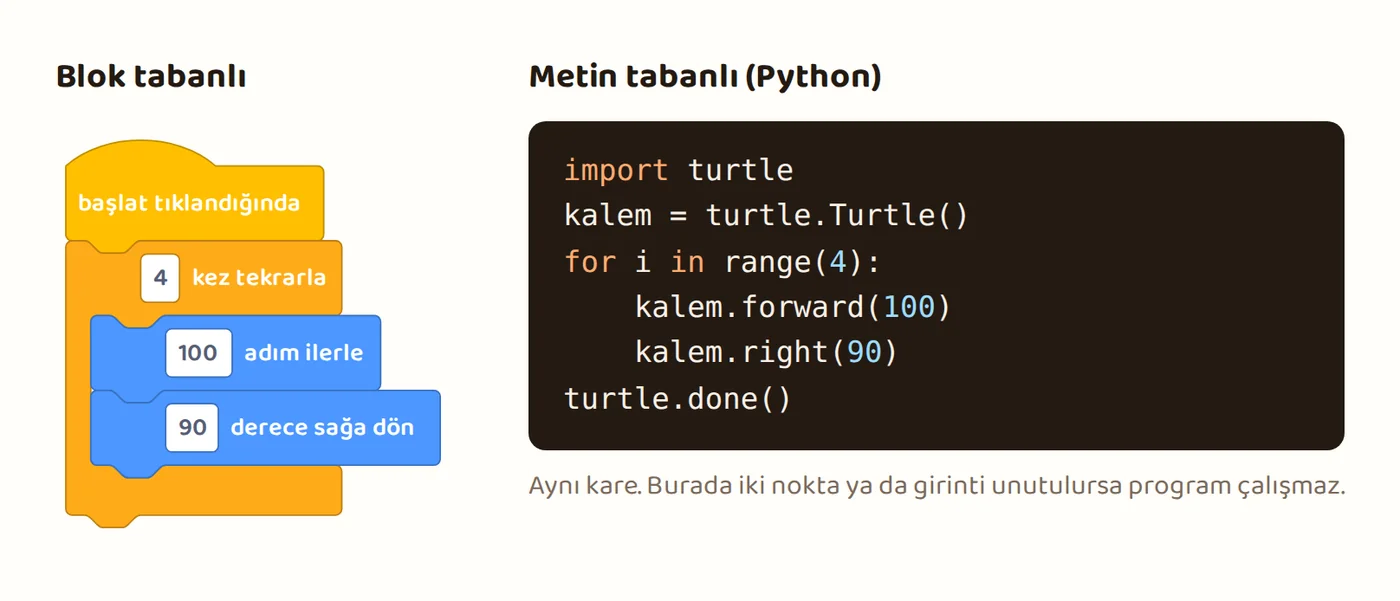
The fourth row of the table matters: blocks remove syntax errors but not logic errors. A loop in the wrong place, a condition written backwards or a variable that isn't reset happen with blocks too. Finding these errors is exactly what we want students to learn.
The 2018 BTY coding guide from the Ministry of National Education (MEB) describes the difference the same way: in a block-based language you don't need to memorize the command list or the syntax, mistakes like forgetting a semicolon or a closing bracket don't happen, and students spend more time thinking about the logic of the project.
Where is it in the curriculum?
- Bilişim Teknolojileri ve Yazılım, grade 5: "Being able to manage the software development process in a block-based environment" (BTY.5.6.4). The outcomes before it are algorithms, testing, and components like variables, loops and decisions. This theme is 24 class periods in grade 5.
- Bilişim Teknolojileri ve Yazılım, grade 6: All three outcomes of the software theme are in a block-based environment: using components, managing the process and producing an AI-supported product (BTY.6.6.1-6.6.3). This theme is 34 class periods in grade 6.
- Robotik Kodlama, level 1: In theme 2, students get to know, choose and set up "an online block-based software development environment" (RK1.2.1). In theme 3, they write and test their robotics program in this same environment (RK1.3.3, RK1.3.4). Level 2 moves on to offline coding environments.
The BTY curriculum describes the environment as a block-based environment that is "structured, education-focused and suitable for use under teacher guidance," and it doesn't name any tool. The "chooses the environment" step of RK1.2.1 in the Robotik Kodlama curriculum asks students to see more than one environment and choose the one that fits their goal.
What does the research say?
- Starting with blocks doesn't make the next text language harder. In a study with high school students (Weintrop and Wilensky, 2019), one group started with blocks for 5 weeks and the other with text. Then both groups learned Java for 10 weeks. After Java, there was no significant difference left between the two groups. Starting with blocks did no harm, but it gave no lasting advantage either.
- Students who learned with blocks may have an advantage when moving to text. Students who learned Scratch in middle school learned new topics faster and with less difficulty when they moved to a text-based language in high school (Armoni, Meerbaum-Salant and Ben-Ari, 2015).
- The average effect is "medium." A Turkish meta-analysis combining 24 studies found that block-based coding tools have a medium effect on academic achievement, attitude and computational thinking skills (Gürbüztürk and Yılmaz Tanataş, 2024).
- Some students don't count blocks as "real programming." In Weintrop and Wilensky's study of high school students' views, this perception shows up in some of the students. That's why, at a more advanced level, showing the text view of the same program helps students' motivation. Many environments have this view.
Skills block-based coding builds
This is a question teachers ask often. Looking at the outcomes in the curricula, these skills stand out:
- Algorithmic thinking: Breaking a problem into steps and putting the steps in the right order.
- Testing and debugging: Running the program and comparing it with the expected result, finding where the error is and fixing it.
- Abstraction and reuse: Shortening repeated steps with a loop, and repeated tasks with a function (defining your own block).
- Working with data: Keeping a value in a variable and changing it.
- Making and presenting: Producing a game, an animation or a robot program and explaining it to classmates.
There is also one thing a block-based environment doesn't build: the habit of typing correct syntax on a keyboard. That is practiced separately when moving to a text-based language.
Five questions to ask when choosing a tool
- Does it require an account? Most platforms that require an account ask for parental consent for users under 13. Since students' personal data is involved too, a way that needs no account is easiest for the first classes. If an account is needed, prefer class accounts created from a teacher account.
- Does it work without the internet? If the lab's internet connection is weak, a tool with a downloadable version saves the class.
- Is the interface in Turkish? In grade 5, English block names are a serious obstacle.
- Is there an age limit? Some online simulation and coding sites exclude users under 13 entirely in their terms of use. Check the site's terms page before using it in class.
- Is there a simulation for robotics? Theme 3 of the Robotik Kodlama course first asks for building circuits with online simulation tools. A block environment that works together with a circuit simulation makes your work easier in this theme. The tools in the table below have no circuit simulation, so theme 3 needs a separate circuit simulation tool.
Free tools
The tools below are free and come from nonprofit organizations or open source projects. The information was checked on October 6, 2026, on the tools' own pages and source code repositories.
| Tool | Account | Offline | Turkish | Note |
|---|---|---|---|---|
| Scratch | Not needed for the editor, needed for sharing | Has a downloadable app (Windows, macOS, ChromeOS, Android tablet) | Yes | According to its makers, designed for ages 8-16. Student accounts without email can be created with a teacher account |
| Snap! | Not needed | Has a downloadable version | Yes | Strong for defining your own blocks and advanced topics, better suited to grade 6 and up |
| Blockly Games | Not needed | Has a downloadable version | Yes, fully translated | Short puzzles for people who have never programmed, good for the first class |
| EBA Mobil Kod | We could not check | Released in 2019 for web, iOS and Android. We could not check which version works today | Turkish | A block-based coding game from MEB YEĞİTEK (General Directorate of Innovation and Educational Technologies). Made for the grade 5-6 learning outcomes of the 2018 curriculum |
Simplified tablet versions designed for ages 5-7 are too early for middle school. Because they are made for children who are just learning to read and write, a grade 5 student gets bored within a few classes.
The first four classes
The flow below works in any block-based environment. Each class is 40 minutes.
Class 1: The interface and a first program. In the first 10 minutes, introduce the parts of the environment: the block list, the code area and the stage where the result appears. Task: the sprite or virtual robot should draw a square. Students first stack the "move forward, turn right" blocks four times. At the end of the class, ask "Can we write this by repeating a single block?" and leave the answer for the next class.
Common mistakes:
- The program doesn't start at all. The student has put the blocks in the code area but hasn't attached them to a start block (for example "when green flag clicked").
- The sprite moves but no line appears. In most environments drawing needs a separate "pen down" block. In some environments the pen blocks are in a separate extension that has to be added first.
- The old drawing stays on every run, and the sprite starts from where it stopped. Put "clear," "go to the starting point" and "point to the right" blocks at the start of the program. Setting up the starting state is also the fix for the score bug in class 4.
Class 2: Loops. Rewrite the square with "repeat 4 times." Then ask for a triangle and a hexagon. Students find the turn angle by trying. For fast finishers: a flower with a nested loop (drawing the hexagon 6 times while turning).
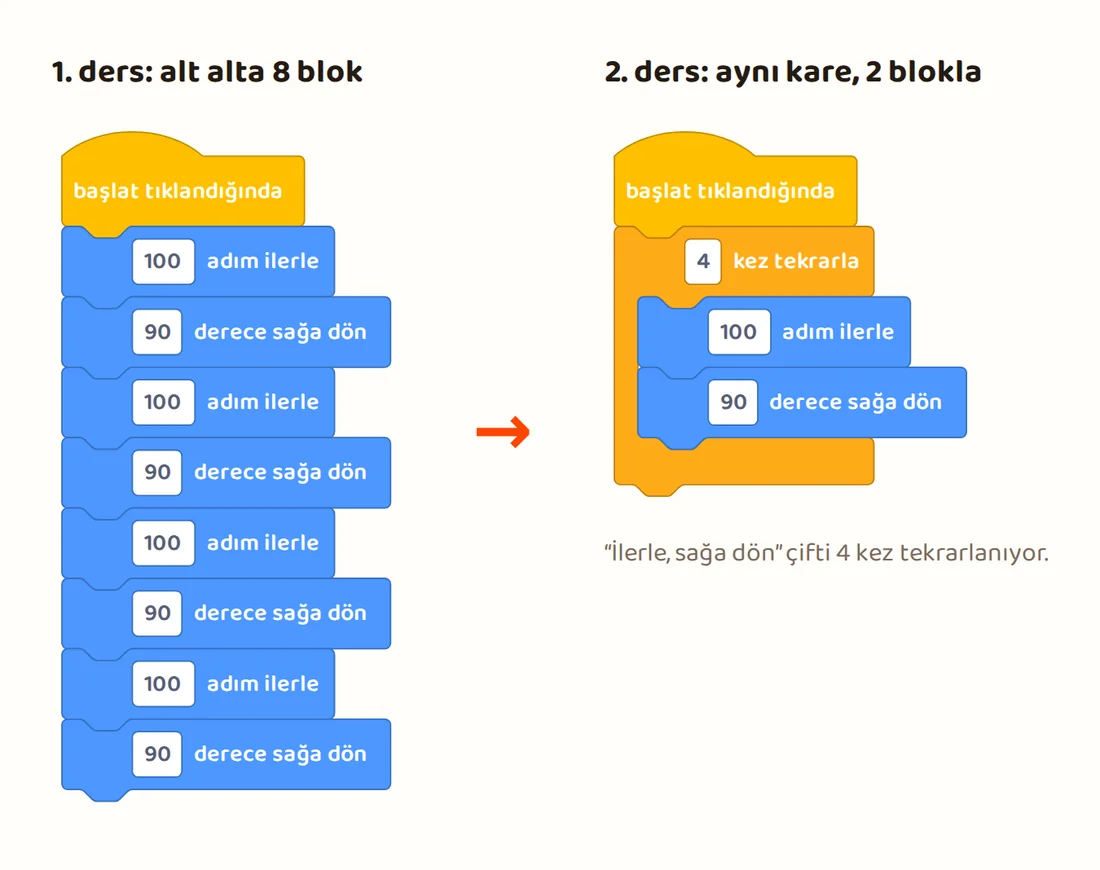
Common mistake: For the triangle, students first try 60 degrees, because they know a triangle's interior angle is 60 degrees. That doesn't make a triangle, the right answer is 120 degrees. Let the students find the rule: when the sprite finishes the shape it has turned one full turn, so you divide 360 by the number of sides. Square 90, triangle 120, hexagon 60.
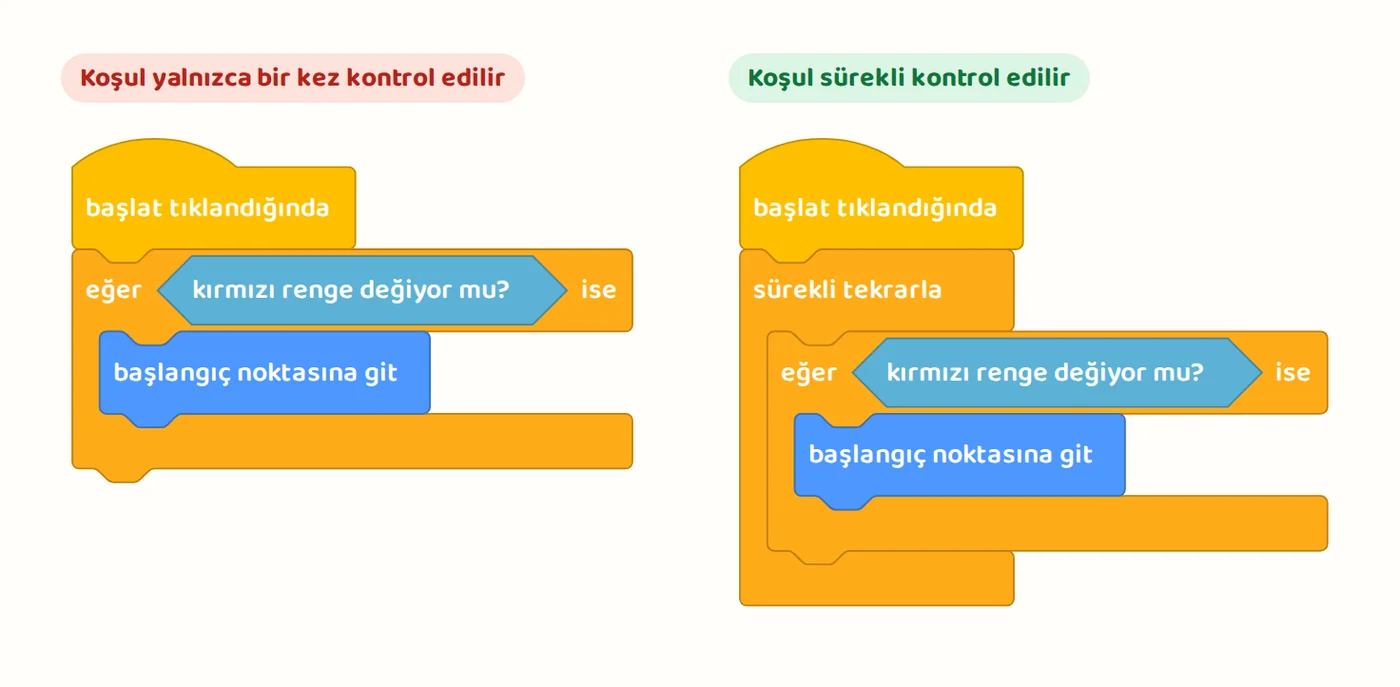
Class 3: Conditions. Program what happens when a key is pressed or when the sprite touches a color: "If touching red, go back to the start." A simple maze game is enough for this class. If you have students draw the maze, the class goes to drawing. Give them a ready-made maze backdrop, or have them draw a few red rectangles you show on the board in 5 minutes.
Common mistake: The condition is checked only once. If the condition block isn't put inside a loop that repeats forever, the program checks the situation only at the start. This is the same as a robotics program that reads a sensor once and stops.
Class 4: Variables. Add a "puan" (score) variable to the maze game. The score goes up by 1 each time the sprite reaches the goal and down by 1 each time it touches a wall.
Common mistakes:
- Every time the game starts, the score continues from where it left off. The "set puan to 0" block at the start has been forgotten. Leaving this bug in on purpose in the first try and waiting for the student to find it is a good testing exercise.
- The score goes up or down several times from a single touch. As long as the sprite stays on the goal or the wall, the condition is true at every check. The "go back to the start" from class 3 prevents this. If a student removes that block, the problem appears, which makes a good debugging example.
These four classes cover the variable, loop and decision components in BTY.5.6.3 and the environment and component outcomes in theme 2 of Robotik Kodlama. If you don't have a lab, see our post on unplugged coding activities to work on the same concepts on paper.
Frequently asked questions
Does it work on tablets? It does, but dragging blocks with a finger on a small screen is tiring. If you're going to use tablets, choose a tool that is touch-friendly and has a downloadable version.
Should I have students create accounts? Not for the first classes. When projects need to be saved, most tools let you download the file and save it on the computer. If accounts are created, do it with parents informed and the school administration's approval, through a teacher account if possible.
When should we move to a text-based language? Moving to text is not required in the middle school curricula. Level 2 of the Robotik Kodlama course moves on to offline coding environments and the concept of compiling code. An environment that can also show its blocks as text makes this transition smoother.
How many class periods go to each theme in the Robotik Kodlama course? In the curriculum's time table, theme 2 of level 1 is 16 class periods and theme 3 is 22 class periods. For how they are spread across the weeks, see our post Elective Robotik Kodlama yearly plan 2026-27.
Sources
- MEB, Bilişim Teknolojileri ve Yazılım Dersi Öğretim Programı (Information Technologies and Software curriculum) (BTY.5.6.1-5.6.4, BTY.6.6.1-6.6.3). tymm.meb.gov.tr
- MEB, Robotik Kodlama Dersi Öğretim Programı (Ortaokul) (Robotics Coding curriculum, middle school), RK1.2.1, RK1.3.3, RK1.3.4. tymm.meb.gov.tr
- MEB YEĞİTEK (2018), 5. ve 6. Sınıf Bilişim Teknolojileri ve Yazılım Dersi Kodlama Kılavuzu (coding guide for the grade 5 and 6 BTY course), section 3.4. adana.meb.gov.tr
- Weintrop, D. and Wilensky, U. (2019). Transitioning from introductory block-based and text-based environments to professional programming languages in high school computer science classrooms. Computers & Education. doi.org
- Weintrop, D. and Wilensky, U. (2015). To block or not to block, that is the question: students' perceptions of blocks-based programming. IDC '15. doi.org
- Armoni, M., Meerbaum-Salant, O. and Ben-Ari, M. (2015). From Scratch to "Real" Programming. ACM Transactions on Computing Education. doi.org
- Gürbüztürk, O. and Yılmaz Tanataş, D. (2024). Blok Tabanlı Kodlama Araçlarının Akademik Başarı, Tutum ve Bilgi İşlemsel Düşünme Becerisine Etkisi: Meta-Analiz Çalışması. İnönü Üniversitesi Eğitim Bilimleri Enstitüsü Dergisi. doi.org
- Scratch, download page and source code repositories. scratch.mit.edu
- Snap!, offline use. snap.berkeley.edu
- Blockly Games, about page. blockly.games
- MEB YEĞİTEK, "Mobil Kod app now available on EBA" (May 22, 2019). yegitek.meb.gov.tr
Sources accessed: October 6, 2026.