Short answer: In 2026-27, students who choose the Robotik Kodlama (Robotics Coding) elective course for the first time take Level 1 of the new curriculum. The course runs 2 class periods a week, and the school year is 37 weeks, so the calendar has 74 class periods. The curriculum's time table gives Level 1 72 class periods: Theme 1 gets 8, Theme 2 gets 16, Theme 3 gets 22, Theme 4 gets 22, plus 4 for school-based planning. Below is a weekly plan we prepared from these hours, the 2026-27 school calendar of MEB (the Ministry of National Education) and the official holidays. The Ministry has not published a draft yearly plan for Robotik Kodlama. You need to adapt the plan to your own school with your subject team (zümre).
First: which students follow which plan?
Under the decision of the Talim ve Terbiye Kurulu (Board of Education) dated August 7, 2026, the new curriculum is being phased in "for students who will choose the course for the first time." The old 2023 curriculum is also being phased out. Two things follow from this:
- The level depends on how many times a student has taken the course, not on their grade. A grade 6 student who chooses the course for the first time also takes Level 1. The weekly timetable says that in electives, groups can be formed from students in different grades who are at the same level in the course they chose.
- Students who took the course last year and are taking it a second time this year started with the old curriculum. These students are expected to continue with Level II of the old curriculum, but the decision text does not say this explicitly. Clarify it with your school administration. Level 2 of the new curriculum will come up in 2027-28, for students who finish Level 1 under the new curriculum.
When you download one of the plans online, watch out for files split into a "grade 5 plan" and a "grade 6 plan." The right split is by level, not by grade.
Theme hours: two pages of the curriculum say different things
The time table in the curriculum PDF and the theme pages on the TYMM (Türkiye Century Education Model) website give different hours for the first two themes of Level 1:
| Theme | Time table (curriculum PDF) | Theme page (TYMM website) |
|---|---|---|
| 1. Introduction to Robotic Systems and Basic Programming | 8 | 6 |
| 2. Robotic System Development Environments and Components | 16 | 18 |
| 3. Robotic Circuit Design | 22 | 22 |
| 4. Robotic Applications at Different Levels | 22 | 22 |
| School-based planning | 4 | (none) |
| Total | 72 | 68 |
The plan below uses the curriculum's official time table (8/16/22/22 + 4). If you want to use the hours on the theme page, just move week 4 into Theme 2. Writing a note under the plan about which one you chose makes things easier if it comes up during an inspection.
Dates to watch in the 2026-27 calendar
- School year: September 14, 2026 - June 25, 2027. Semester 1 ends on January 22, 2027.
- Mid-term breaks: November 16-20, 2026 and March 8-12, 2027. Semester break: January 25 - February 5, 2027.
- Holidays that fall on weekdays: Wednesday afternoon, October 28; Thursday, October 29; Friday, January 1; Friday, April 23; and Monday-Wednesday, May 17-19, of Kurban Bayramı (Eid al-Adha). Ramazan Bayramı (Eid al-Fitr: eve on March 8, holiday on March 9-11) falls during the mid-term break. May 1 falls on a Saturday.
- School written exams: The Assessment and Evaluation Regulation places exam 1 between late October and early November, and exam 2 between late December and early January. According to announcements quoting the Ministry's 2026-27 letter, the school exam windows are November 2-13, January 4-15, March 29-April 9 and June 7-18. Follow the calendar your school announces.
Depending on which day your class meets, some of these holidays will not affect you. That is why the last week of the plan is left as a buffer.
Suggested weekly plan: Robotik Kodlama Level 1, 2026-27
The image shows the Turkish original.
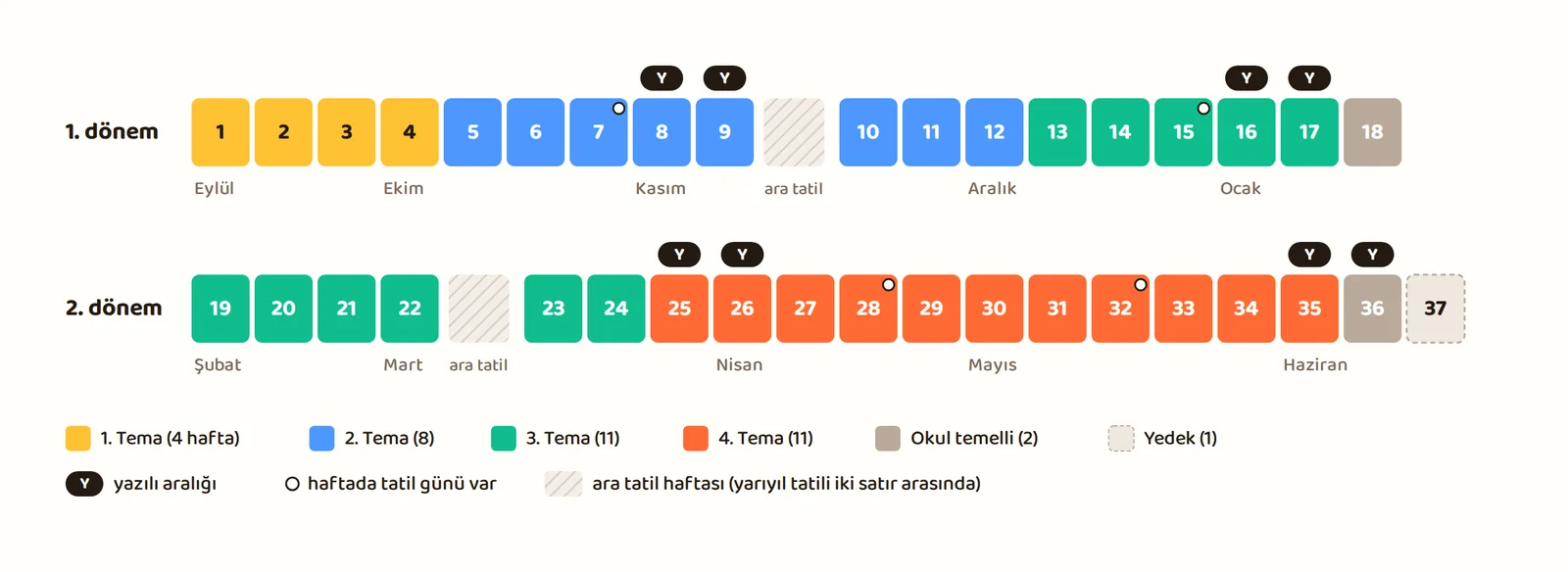
| Week | Dates | Theme | Learning outcome | Suggested class activity | Note |
|---|---|---|---|---|---|
| 1 | September 14-18 | Theme 1 | RK1.1.1 | Robot or not? Card sorting; defining sense, decide, act | If elective groups are formed this week, the activity merges with week 2 |
| 2 | September 21-25 | Theme 1 | RK1.1.1 / RK1.1.2 | Where robotic systems are used; ethics, safety and privacy case cards | |
| 3 | September 28 - October 2 | Theme 1 | RK1.1.3 | Teacher robot: write commands on paper, follow them literally; input, process, output | |
| 4 | October 5-9 | Theme 1 | RK1.1.3 / RK1.1.4 | Flowchart symbols, a chart with one decision; swapping charts and debugging | |
| 5 | October 12-16 | Theme 2 | RK1.2.1 | Getting to know an online block-based environment: interface, stage, toolbox; saving and opening a project (without an account) | |
| 6 | October 19-23 | Theme 2 | RK1.2.1 | Doing the same small task in a second environment; comparing the two and choosing the one that fits the goal | |
| 7 | October 26-30 | Theme 2 | RK1.2.2 | Sequential program: drawing a square with one block at a time; drawing the program's flowchart (review before the exam) | October 28 half day, Thursday October 29 official holiday |
| 8 | November 2-6 | Theme 2 | RK1.2.2 | Repeat block: drawing the same square with a loop, comparing the two ways | Semester 1, exam 1 window |
| 9 | November 9-13 | Theme 2 | RK1.2.2 | Event blocks: when clicked, when a key is pressed | Semester 1, exam 1 window; next week is mid-term break 1 |
| 10 | November 23-27 | Theme 2 | RK1.2.2 | Condition blocks: if, else | |
| 11 | November 30 - December 4 | Theme 2 | RK1.2.2 | Tracing code flow; finding a bug in someone else's program | |
| 12 | December 7-11 | Theme 2 | RK1.2.2 | Short block project and peer review | |
| 13 | December 14-18 | Theme 3 | RK1.3.1 | Circuit in a simulation environment: power, board, output unit; wiring the LED with a series resistor and the right way around from day one | |
| 14 | December 21-25 | Theme 3 | RK1.3.1 | Blinking LED in the simulation; a traffic light with three LEDs (sequential program and wait) | |
| 15 | December 28 - January 1 | Theme 3 | RK1.3.1 | Button input in the simulation; the button resistor | Friday January 1 official holiday |
| 16 | January 4-8 | Theme 3 | RK1.3.1 | Light or distance sensor in the simulation; reading values | Semester 1, exam 2 window |
| 17 | January 11-15 | Theme 3 | RK1.3.1 / RK1.3.3 | Deciding by sensor value: threshold, if / else | Semester 1, exam 2 window |
| 18 | January 18-22 | School-based planning | Work chosen by the subject team (e.g. semester project presentations, a robotics event or a field trip) | January 22 end of semester 1 | |
| 19 | February 8-12 | Theme 3 | RK1.3.3 | Planning a robotic program: problem, input, output, flowchart | |
| 20 | February 15-19 | Theme 3 | RK1.3.2 | Real circuit: safe work rules; building the same LED and resistor circuit as in the simulation, noting the differences | If there is only one kit, groups take turns building, the others work in the simulation |
| 21 | February 22-26 | Theme 3 | RK1.3.2 | Real circuit: button (resistor or the board's internal resistor) | |
| 22 | March 1-5 | Theme 3 | RK1.3.2 / RK1.3.3 | Real circuit: light or distance sensor; deciding by a threshold value | Next week is mid-term break 2 (Ramazan Bayramı falls during this break) |
| 23 | March 15-19 | Theme 3 | RK1.3.3 / RK1.3.4 | Running the robotic program on the real circuit; testing with sample inputs, debugging | |
| 24 | March 22-26 | Theme 3 | RK1.3.2 / RK1.3.4 | Evaluating the circuit and the program together; short presentation | |
| 25 | March 29 - April 2 | Theme 4 | RK1.4.1 | Choosing a product: one of the teacher's ready-made product cards or the group's own idea that can be built with the parts in the classroom; setting criteria | Semester 2, exam 1 window |
| 26 | April 5-9 | Theme 4 | RK1.4.1 | Requirements, materials list and flowchart | Semester 2, exam 1 window |
| 27 | April 12-16 | Theme 4 | RK1.4.1 | Circuit sketch; dividing up tasks | |
| 28 | April 19-23 | Theme 4 | RK1.4.1 | Prototype 1: circuit and program in the simulation | Friday April 23 official holiday |
| 29 | April 26-30 | Theme 4 | RK1.4.1 | Building with real hardware, groups take turns; groups without the kit test and debug in the simulation | |
| 30 | May 3-7 | Theme 4 | RK1.4.1 | Building with real hardware, taking turns; short interim presentation and peer feedback | |
| 31 | May 10-14 | Theme 4 | RK1.4.1 | Building with real hardware, taking turns | |
| 32 | May 17-21 | Theme 4 | RK1.4.1 | Buffer and catch-up: groups that have not finished building | Kurban Bayramı: Monday-Wednesday May 17-19 holiday |
| 33 | May 24-28 | Theme 4 | RK1.4.1 | Testing against the criteria: does it work, is it safe, can everyone use it? Fix list for prototype 2 | |
| 34 | May 31 - June 4 | Theme 4 | RK1.4.1 | Prototype 2: fixes and retesting; preparing a short showcase | |
| 35 | June 7-11 | Theme 4 | RK1.4.1 | Product presentations and self-assessment | Semester 2, exam 2 window |
| 36 | June 14-18 | School-based planning | Work chosen by the subject team (e.g. end-of-year product exhibition) | Semester 2, exam 2 window | |
| 37 | June 21-25 | Buffer | Making up a class lost to a holiday, or end-of-year review; counting and collecting the kits | June 25 end of school year |
The suggested activities are our own suggestions, based on the curriculum's learning outcomes. The curriculum recommends unplugged activities in schools with limited resources, and at Level 1 it also recommends online block-based programming and simulation tools. In a school without kits, the real-circuit weeks of Theme 3 can be taught with simulation. If there is only one kit, keep the rotation going from week 20 to the end of Theme 4 so every group gets its hands on the kit at least once or twice. For each new circuit, do a short demo with the kit yourself first. When choosing a simulation environment, if possible pick one that can simulate the board your school uses. The code and wiring then carry over to the real board unchanged, and students do not have to learn two different interfaces.
Do not leave the product idea in Theme 4 completely open. In grades 5-6, a free choice often leads to a product that cannot be built with the parts in the classroom. Prepare 4-5 ready-made product cards, and let any group that wants to propose its own idea. Card examples: a flowerpot that warns when the soil dries out, a parking sensor, an automatic night light, a door alarm. All of them can be built with LEDs, a button, a buzzer and a single sensor.
Why did we order the plan this way?
- Theme 1 is finished by exam 1. Theme 1 is completed before the exam weeks, and Theme 2 covers sequential programs and the repeat block. The square is drawn first with one block at a time, then with the repeat block. The flowchart is also reviewed once more in week 7. For a sample exam 1 with an answer key, see our post Robotics Coding semester 1, exam 1 questions.
- Simulation comes before the real circuit. In Theme 3, students first work with the LED, button and sensor in a simulation environment. Once they understand the circuit logic, they move on to the real circuit. The LED is built with a resistor from day one, and the button resistor is also discussed in the simulation. In the real circuit, only one new part is added each week: first the LED, then the button, then the sensor.
- The 4 class periods of school-based planning were put at the ends of the two semesters, 2 periods each. The last week of semester 1 (week 18, January 18-22) and the second-to-last week of semester 2 (week 36, June 14-18). The subject team decides what happens in these periods. For example, presentations of semester projects, a robotics event or an end-of-year product exhibition.
- Theme 4 was spread over 11 weeks. Taking a single product from idea to prototype, testing and presentation takes time. Two rounds of prototypes let students really experience debugging. Real building was placed in weeks 29-31, and week 32, which falls on Kurban Bayramı, was left as a buffer. This also leaves time for debugging on real hardware.
Official rules for the yearly plan
According to the directive on planned implementation, the yearly plan is a work plan that shows in which months, and in roughly how much time, the themes and units of the curriculum will be covered. In short:
- The yearly plan is prepared according to the weekly timetable and based on the Ministry's school calendar.
- Teachers in the grade or subject team prepare the plan together at the start of the school year and submit it to the school administration.
- The principal approves the plans within 15 days of the start of the school year.
- The teacher keeps a copy of the approved plan on hand, printed or electronic, and shows it to the principal and the inspector when asked.
- The teacher reports any problems during the year along with their reasons.
- For a student with special education needs, a BEP (individualized education program) is prepared, and no separate yearly plan is prepared.
- The time set aside for school-based planning is planned during the year and shown in the yearly plan.
The directive also asks that the yearly plan be prepared with the joint input of the school administration and the subject team teachers, and that it be reviewed at a meeting at the end of the school year. If Robotik Kodlama is taught by a single teacher at your school, ask your school administration how the subject team should be formed.
Common mistakes we see in online plans
We reviewed the robotics coding yearly plans shared for 2026-27. Before you download and use a plan, check the following:
- Is it the old curriculum? The four themes of the new curriculum carry the names in the table above, and the learning outcome codes look like "RK1.1.1." If a plan does not have these names and codes, it was most likely prepared for the 2023 curriculum and does not fit students choosing the course for the first time.
- Grade or level? Files split into a "grade 5 plan" and a "grade 6 plan" do not fit the level logic.
- Are the holiday weeks right? Ramazan Bayramı is March 9-11 and falls during the mid-term break. In the Kurban Bayramı week (May 17-21), classes are held only on Thursday and Friday. Some plans show this week as a full 2 class periods.
- A textbook that does not exist. Robotik Kodlama is not on TYMM's list of basic education textbooks. Fix any plan that says "textbook" in the materials column.
- The same method in every row. A method column that says "lecture, question and answer" in every week is no use in an inspection. Write what is actually done in the hands-on weeks.
- Citing the old directive. If the plan's footnote cites the 2022 directive, the current one is the directive dated September 12, 2024.
Adapting the plan to your own school
- Check which day your class meets. If your class is on Thursday, you lose a class in the October 29 week; if it is on Friday, in the January 1 and April 23 weeks; if it is Monday-Wednesday, in the Kurban Bayramı week. Merge that week's topic with the following week, or use the buffer time in the last week.
- Book the computer lab at the start of the semester. From Theme 2 on, an online block-based environment is used.
- Work without accounts. With most services, opening an online account for students under 13 requires parental consent. Prefer environments that work without an account, and save projects as files.
- Fit project and participation grades into the plan. In a class that meets 2 periods a week, two participation grades are given each semester. The Theme 4 product is also a good topic for the project students must prepare at least once a year.
Sources
- Ortaokul Robotik Kodlama Dersi Öğretim Programı (Middle School Robotics Coding Curriculum), PDF (time table, learning outcomes, implementation principles). tymm.meb.gov.tr
- TYMM Robotik Kodlama theme pages, Level 1. tymm.meb.gov.tr
- Tebliğler Dergisi (official bulletin), August 2026 supplement, Talim ve Terbiye Kurulu decision no. 77 dated 07/08/2026. dhgm.meb.gov.tr
- Weekly timetable for primary and middle schools, Talim ve Terbiye Kurulu decision no. 4 dated 09/05/2025. ttkb.meb.gov.tr
- Ministry of National Education, 2026-2027 school year calendar. meb.gov.tr
- Diyanet İşleri Başkanlığı (Presidency of Religious Affairs), list of 2027 religious days. vakithesaplama.diyanet.gov.tr
- Eğitim Öğretim Çalışmalarının Planlı Yürütülmesine İlişkin Yönerge (Directive on the Planned Implementation of Education Work, September 12, 2024), articles 9, 10 and 12. mevzuat.meb.gov.tr
- TYMM, school-based planning. tymm.meb.gov.tr
- TYMM list of basic education textbooks. tymm.meb.gov.tr
- TYMM draft framework (yearly) plans for basic education. tymm.meb.gov.tr
- Ministry of National Education Assessment and Evaluation Regulation, article 5. mevzuat.gov.tr
- Regulation on Preschool Education and Primary Education Institutions, article 22. mevzuat.gov.tr
Sources accessed: October 6, 2026.